
Top 3 Ways to Use Your Home Warranty Account Online
APRIL 16, 2026 | Home Care Buzz Experts | 3 minute read
Blog Summary
File a home warranty service request online anytime, from any device, in minutes.
Check your coverage and track repair status in real time from your Homeowner Center.
Unlock exclusive member benefits such as appliance discounts, savings on air filters, refrigerator water filters, home improvement services, and more.
Your First American Home Warranty account is your 24/7 home command center. Whether you’re filing a service request, checking coverage, tracking service progress, or tapping into exclusive member benefits, your Homeowner Center makes it easy to manage your home warranty anywhere, anytime.
Here are three ways to get the most out of your First American home warranty account online.
1. Submit a Home Warranty Service Request Online Anytime
When a covered home system or appliance breaks, you want it fixed fast. Your Homeowner Center lets you submit a home warranty service request online in just a few clicks. It’s the simplest way to file a home warranty claim online, day or night. Simply sign in to your account (or create one) from your phone, laptop, or desktop and click Request New Service.
Once your service request is submitted, you follow your home warranty claim status online from the Homeowner Center dashboard. You can also opt in to receive text notifications about your request.
Watch the short video below to learn how easy it is to request service online in the Homeowner Center.
2. Check Your Coverage Details Before You File
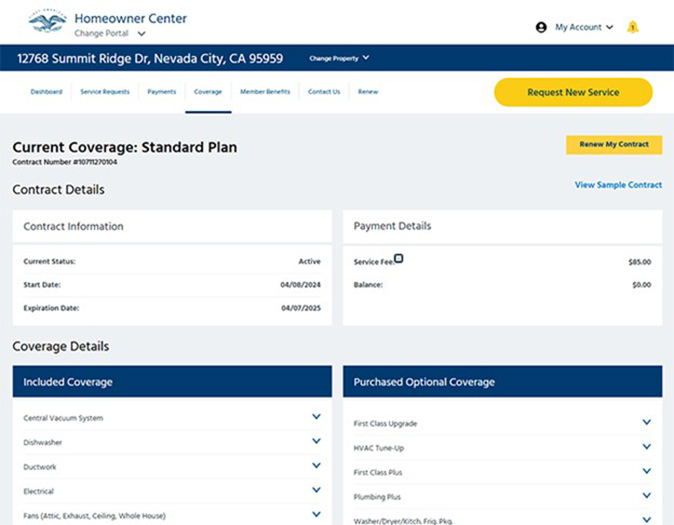
Unsure what your plan covers? A quick home warranty coverage check is easy from your Homeowner Center — no paperwork needed. It gives you instant visibility into your coverage details, covered systems and appliances, and contract terms.
After you sign in, click Coverage in the menu bar. Under Coverage Details, you’ll see what’s included in your home warranty plan, along with any additional coverage options and upgrades you’ve purchased. You can click each item to view specifics and limitations and download or print your contract for easy reference.
Understanding your home warranty coverage is important because knowing what’s covered (and what’s not) before submitting a home warranty service request saves time and sets the right expectations.
3. Manage Your Account and Access Member Benefits
Your Homeowner Center is more than a claims portal; it’s where you manage your entire home warranty relationship with First American. From one dashboard, you can:
- Pay your service fees online
- Track home warranty claim status
- Review your Current Coverage and renew your home warranty coverage
- Download your free Home Maintenance Guide (My Account → Resources)
- Update your contact and billing information
Exclusive Members-only Benefits
Every First American home warranty comes with exclusive member benefits that go well beyond home warranty coverage. Best of all, you can use them starting on day 1 of coverage. Find them in the main menu of your Homeowner Center. Current perks include:
- Up to 40% off new brand-name appliances
- Discounts on handyman and home improvement services
- Savings on air filters and refrigerator water filters… and much more
To access your member benefits, simply sign in to your Homeowner Center and navigate to the Member Benefits section in the main menu.
Sign In and Take Control
Setting up your Homeowner Center account takes only a few minutes and gives you complete control of your coverage on your schedule. Submit home warranty service requests, track repairs, check your plan details, and unlock member perks, all from one place.
Ready to get started? Sign in to your Homeowner Center and make the most of your First American home warranty.
Learn more: Discover when to use your home warranty and the benefits of using your coverage.
FAQs About Home Warranties
How do I sign into my First American Home Warranty account?
Visit your Homeowner Center and enter your email and password. If you haven’t registered for an account yet, follow the prompts to create one.
Can I check if a repair is covered before I submit a request?
Yes! Your online account lets you review your plan and coverage details anytime. It’s the fastest way to know what’s included (and what’s not).
What information do I need to file a service request online?
Once you are signed into your Homeowner Center, navigate to the Coverage section and select the covered item, describe the issue, and confirm your contract details. The more details you provide, the better we can help.
What happens after I file a request?
You’ll receive a confirmation email and can track the claim status in your Homeowner Center. We'll assign a prescreened technician to your claim and keep you updated throughout the repair process.


Keep Reading





Home Care Buzz Experts
The First American Home Care Buzz team is made up of experienced home warranty writers and editors. Our team provides valuable insights and information to help homeowners like you meet the daily challenges of homeownership.
This article is about...