
If you have a thermostat in your home, odds are you’re familiar with every family’s battle of the ages: what’s the right temperature and fan setting for efficient heating, cooling, and optimal savings? Sure, personal preference comes into play — some people like a warmer home, and some people have an ideal temperature that’s cooler. If you're looking for relief, read our thermostat tips to find out the recommended thermostat setting for summer and winter along with other energy-saving tips for thermostats.
Select Your Thermostat Style
Perhaps the biggest decision you must make when it comes to thermostats in your home is choosing between a manual, programmable, or smart unit. Whether you’re looking for how to save money on heating and cooling your home, how to make your systems more energy-efficient for the environment, or just want to keep your home comfortable with minimal effort, each of these styles comes with benefits.
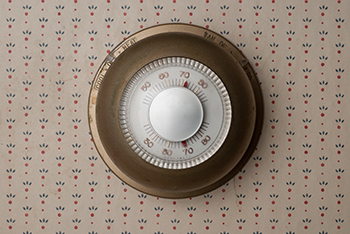 A manual thermostat is the oldest type of temperature-control device. While uncommon in newer homes, they are still on the market and found in many older homes. This type of thermostat requires the user to set the temperature and change it manually via a switch or knob. Manual thermostats can be analog or digital, but a screen that reads the temperature and shows a low-battery warning is about as high-tech as these units get. While they may be the most cost-effective thermostats, they typically aren’t as effective at reading or regulating the temperature. So, if you’re looking for how to save money on AC and heating bills, manual thermostats may not be the best option because you can never be quite sure if you’ve reached the recommended thermostat settings.
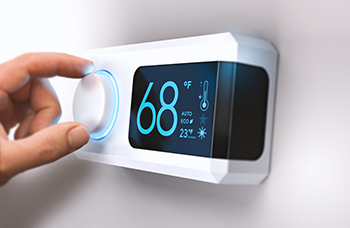 A programmable thermostat is one step up from a manual or analog unit. Programmable thermostats can be set to keep your home comfortable at different times of the day and can switch between heating and air conditioning to keep your home at peak comfort levels. While programmable units are more expensive than their manual counterparts, they’re less pricy than the next step up — smart thermostats. Programmable thermostats are energy efficient and cost-effective, especially when placed correctly in the home (more on this below), and may be a good fit for those not ready to move into the smart home space.
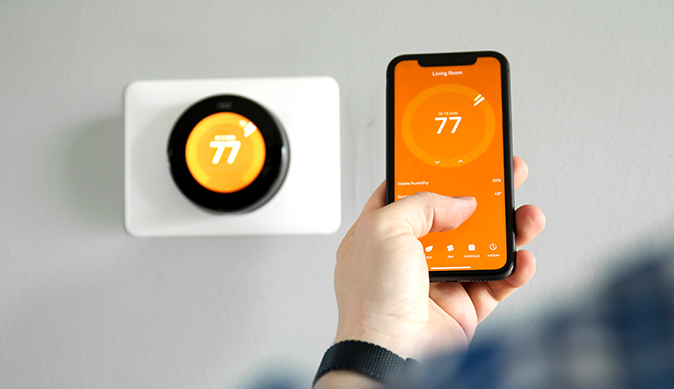
A smart thermostat is the most advanced option and can be paired with your phone or another mobile device to give you maximum control over your home’s temperature, even when you’re not there. You can connect a smart thermostat to Wi-Fi, which enables you to adjust its temperature without getting up from bed to turn on the heat on a chilly night or crank up the AC on your way home from a workout. Some models can even learn your temperature preferences and habits, then adjust themselves accordingly. They offer all the benefits of programmable thermostats and more but at a higher price point. However, if you’re serious about learning how to set your thermostat to save money, these are top-of-the-line devices.
Choose a Thermostat Setting
Many people wonder whether setting your thermostat to the “on” or “auto” is more effective. The truth is, there are benefits to both. The “auto” setting offers more energy efficiency, lower humidity, and longer-lasting air filters since the fan only runs when the unit actively adjusts your home’s temperature. The downsides to the “auto” setting include potentially less even distribution of climate-controlled air and wear and tear on your system from stopping and starting repeatedly.
The “on” setting continuously cycles air through your home, even when your system is not actively heating or cooling. Advantages of this setting include better air quality and more even airflow through your home. Since the fan constantly cycles air through your furnace filter with this setting, you’ll likely need to replace your air filters more often. Leaving the fan in the “on” setting may also increase your utility bills since the system continuously uses power.
The “on” setting may be ideal for people who have pets, allergies, or live in older homes where dust may be significant. The “auto” setting can be a good solution for those wanting more efficient and cost-effective heating and cooling.
Determine a Thermostat Location
Your thermostat’s location isn’t just an aesthetic choice. It’s important to choose a central location in your home that is unaffected by drafts from doors and windows and away from sunny, hotter spots in your home. It’s ideal to place your thermostat on an interior wall where it isn’t blocked by any items, and the air around it can flow freely for accurate temperature readings. Installing it in a room where you spend a good amount of time is best for ensuring the areas of your home you use most often are comfortable for your household.
Change Batteries Regularly
If your HVAC system is acting up, the thermostat is often the first component to check. Low or dead batteries in the device can prevent your system from turning on or reaching its set temperature. Many thermostats display a low-battery indicator to tell you when it’s time to replace the batteries. Changing your thermostat’s batteries on the same date each year can be a good idea if having a date saved on your calendar keeps you from forgetting this important chore.
Once you’ve determined your thermostat batteries need to be changed, you can complete the task following these steps:
- Remove the thermostat or cover. Different models have different covers — some may slide up, others may flip outward, and on some models, you may need to push up the entire thermostat unit and remove it from the wall. If you’re not sure how yours works, check the manual or instruction guide that came with your unit or look up your thermostat’s make and model online to find more detailed instructions.
- Replace the batteries. Remove and dispose of your thermostat’s old, dead batteries, and replace them with new ones. Be sure to follow the instructions on the inside of your thermostat cover to complete this step accurately.
- Replace the thermostat or cover. Once you’ve replaced the batteries in your unit, any low-battery warning symbols should disappear. Replace the thermostat cover or place the unit back onto the wall, and it should begin working properly.
Seasonal Thermostat Energy-Saving Tips
Every season comes with its challenges related to temperature and humidity. The best AC temperature for energy saving may not be the best temperature to save money in the winter. Are you wondering, “What’s the best temperature to set my thermostat in winter to save money?” The answer is as close to the outdoor temperature as comfortably possible.
In the winter, it’s important to keep your thermostat set to at least 55 degrees to help prevent frozen pipes and other cold-weather issues. A common energy-efficient temperature for winter is around 68 degrees Fahrenheit. This falls within the normal range for most American homes and should keep you and your family warm without racking up huge energy bills.
Learn more about energy-saving tips for your heating system.
Summer thermostat settings are similar — it’s ideal to set your thermostat to a comfortable temperature but also as close to the outdoor temperature as possible. It’s also best to avoid the temptation to crank up the AC when you first turn it on. This doesn’t make your home cool down any faster and may result in unnecessarily higher utility bills.
Pro tip: The U.S. Department of Energy recommends setting your thermostat 7-10 degrees higher when you aren’t home in the summer to save up to 10% on your cooling costs.
Learn more about maintaining HVAC systems.
Protect Your HVAC System with a Home Warranty
While following these best practices for thermostats may save you money on your monthly energy bills, a home warranty can protect your home and budget when your heating and cooling appliances break down with HVAC system coverage from First American. Get a free home warranty quote today to learn how your plan could save you even more money down the road.
The contents of this article are provided for general guidance only. First American Home Warranty does not assume any responsibility for losses or damages as a result of using this information.




Keep Reading




This article is about...